How to Use the Report Generator

The Report Generator takes a report specification and creates a report for viewing or printing.
The elements that must or can be provided to the Report Generator in the report specification are

  • set of records
  • page structure
  • report headings and footings
  • page headings and footings
  • break headings and footings
  • item position and format
  • How To Construct Report Specifications

    report specification is a series of commands that describe the set of data to be used in the reportthe values to be extracted from the data set, and the formatting to be applied to each value and to the report in general.
    The general form of a report specification is
    REPORT FROM…
    report commands
    ENDREPORT
    Reports can be line-oriented or column-oriented in their formatting.

    How To Use Report Commands

    Between REPORT FROM, that initiates the report and specifies the set of database records on which the report is to be based, and ENDREPORT, that marks the end of the report specification, any meaningful combination of the following commands can be used.

    REPORT HEADING, REPORT FOOTING

    Identifies and formats the data that is to appear at the very start and end of the report.
    Always line-oriented by default, even in column-oriented reports. Can be column-oriented if desired.

    PAGE HEADING, PAGE FOOTING

    Identifies and formats the data that is to appear at the top and bottom of each page of the report.
    Always line-oriented.

    PAGE LEFT, PAGE RIGHT

    In column-oriented reports, specifies “headings” that are to appear at the left-hand and right-hand sides of each page of the report.

    DETAIL LINE

    Extracts and formats values from the set of records specified in the REPORT FROM command, and manages the headings for each set of values.
    Obeys the orientation specified in the REPORT FROM command.

    BREAK

    Specifies the conditions for dividing detail lines into groups and subgroups, and specifies the headings and footings that are to be output for each group.
    The break headings and footings obey the orientation specified in the REPORT FROM command. In column-oriented reports, break headings and footings can be line-oriented if desired. Break headings and footings can differ in orientation.

    COLUMN BREAK

    In column-oriented reports, specifies the headings and footings that are to be output each time DETAIL LINE values carry over to a new tier of the report.

    How To Specify the Report Set

    The set specification is specified in the REPORT FROM command.
    Only those records that fit the set specification are reported. One DETAIL LINE is produced for each record. The records are reported from toto bottom in sequential order. Typically, therefore, the set specification includes a SORT clause to place the records into a logical order.
    Sorting is essential if breaks are to be included in the report. (As each record is processed, the break indicator is checked to determine whether a break has occurred.)

    How To Specify Report Headings and Footings

    Report headings are specified in the REPORT HEADING command; report footings, in the REPORT FOOTING command.
    Report headings are processed before any records identified by the set specification are read.
    The items specified in the report heading are output only once, at the start of the report.
    Report footings are processed after all records identified by the set specification are read.
    The items specified in the report footing are output only once, at the end of the report.

    How To Specify Page Headings and Footings

    Page headings and footings are specified in the PAGE HEADING, PAGE FOOTING, PAGE LEFT, and PAGE RIGHT commands.
    Page headings and footings are processed when a page boundary is reached.
    The items specified in the page headings/footings are output on every page of the reportThe values can vary, however, depending on the source of the items (e.g., the current member from the set specification) and their format (e.g., NOPRINT, SUPPRESS).

    How To Specify Breaks and Break Headings and Footings

    Breaks, with their associated headings and footings are specified in the BREAK (Reports) command.
    Breaks are processed when the break indicator expression changes in value. Many break levels can be specified in one report. Break headings and footings are processed when a break occurs at the corresponding level.
    The items specified in the break heading are output when the first record of the set specification is processed, and when the first record of each new break group is processed. The values can vary, however, depending on the source of the items (e.g., the current member from the set specification) and their format (e.g., NOPRINT, SUPPRESS).
    The items specified in the break footing are output when the last record of each break group is processed, and when the last record of the set specification is processed. The values can vary, however, depending on the source of the items (e.g., the current member from the set specification) and their format (e.g., NOPRINT, SUPPRESS).

    How To Specify Item Position and Format

    The items output by the various report commands can be explicitly specified, drawn from the records identified in the set specification, or produced by the evaluation of an expression that involves groups of such values, plus operators and functions, as desired.
    Each item is individually positioned and formatted using report format options.
    Other formatting of items can be accomplished using character functions such as $trim and $concat.

    How To Specify the Report Page Structure

    The general structure of a report page is specified in the REPORT FROM command.
    Structural details that can be controlled include the overall width and depth of the page, the four margins (top, bottom, left, and right), the spacing between subsequent items on the same line, and the orientation of the entire report (line-oriented or column-oriented).

    Conditional Expressions

    Conditional expressions use the conditional operators to compare operands (typically, value expressions). When evaluated, conditional expressions yield a logical result (true or false), depending if  the condition is satisfied.

    Conditional Operators

    OperatorCondition Being Evaluated
    expr = exprThe values are equal.
    expr <> exprThe values are not equal.
    expr < exprThe left-hand value is less than the right-hand value.
    expr <= exprThe left-hand value is less than or equal to the right-hand value.
    expr > exprThe left-hand value is greater than the right-hand value.
    expr >= exprThe left-hand value is greater than or equal to the right-hand value.
    expr between expr and exprThe value before BETWEEN is greater than or equal to the value to the right of BETWEEN and less than or equal to the value to the right of AND.
    expr not between expr and exprThe value before NOT BETWEEN is less than the value to the right of NOT BETWEEN and greater than the value to the right of AND.
    expr in («expr»)The value before IN is a member of the list of values to the right of IN.
    expr not in («expr»)The value before NOT IN is not a member of the list of values to the right of NOT IN.
    expr is [$]nullThe value on the left is $Null.
    expr is not [$]nullThe value on the left is not $Null.
    expr like patternThe value before LIKE matches the pattern specified to the right of LIKE.
    expr not like patternThe value before NOT LIKE matches the pattern specified to the right of NOT LIKE.

    Note: The AND and BETWEEN expressions are not the Boolean AND.

    Examples of Conditional Expressions

    EmpNum > 1254

    Logically true when EmpNum is 1254.

    DepNum >= EmpNum

    Logically true when DepNum is greater than or equal to EmpNum

    FirstName = ‘Smith’

    Logically true when FirstName is Smith.

    DeptDesc <> ‘Sports’

    Logically true when DeptDesc is anything but Sports.

    EmpNum between 1000 and 2000

    Logically true when EmpNum is in the range 1000-2000.

    LastName like ‘% ith$’

    Logically true when LastName matches the given pattern.

    Event.EventName in (‘F1′,’F2′,’Escape’)

    Logically true when EventName is in the list.

    >ProdCode not between 542 and 863

    Logically true when ProdCode is outside the range 542-863.

    LastName not in (‘Smith’,’Jones’)

    Logically true when LastName is not in the list.

    FirstName not like ‘ Sm%’

    Logically true when Firstname fails to match the pattern.
    Simple conditional expression can be combined into more complex Boolean expressions by using Boolean operators. Also, the Boolean NOT can be used to achieve the same result as the NOT version of BETWEEN, LIKE, and IN.

    Boolean Expressions

    Boolean expressions use Boolean operators to compare operands (typically, conditional expressions). When evaluated, Boolean expressions yield a logical result (true or false), depending on the nature of the Boolean operator and the values of the conditional expressions.
    The standard rules of precedence for Boolean evaluation are used.
    The software ceases to evaluate a Boolean expression as soon as the final result can be correctly predicted. For example, with OR, if the first conditional expression is logically true, then the Boolean expression must be logically true. The software does not bother to evaluate the remaining conditional expressions.
    In the expression

    LastName = ‘Smith’ or DeptNum = ‘Sports’

    if LastName = ‘Smith’ is logically true, then DeptNum = ‘Sports’ is not evaluated.

    Note: Taking Boolean evaluation logic into account can be important to the functioning of an application program. For example, if any of the value expressions in the Boolean expression is written in the special assignment format, the assignment is not made if the portion of the Boolean expression containing the assignment is not evaluated.

    Boolean Operators

    OperatorMeaning
    not exprNOTs the logic expression to the right. If the logic expression is true, the result of the Boolean expression is false; if the logic expression is false, the result of the Boolean expression is true.
    expr and exprANDs two logic expressions (one to the left and one to the right). If both logic expressions are true, the result of the Boolean expression is true; otherwise, the Boolean expression is false.
    expr or exprORs two logic expressions (one to the left and one to the right). If either (or both) of the logic expressions is (are) true, the result of the Boolean expression is true; if both of the logic expressions are false, the Boolean expression is false.
    expr xor exprXORs two logic expressions (one to the left and one to the right). If either of the logic expressions is true, the result of the Boolean expression is true; if both of the logic expressions are true or if both are false, the Boolean expression is false.

    Securing Data Inside an Application

    Permissions

    A permission mask is assigned to all application directories, to all EntitySets and relationships, and to all fields in EntitySets and relationships. The permission mask indicates the type of access that particular user IDs are to have to the object.

    The possible permissions for EntitySets and for relationships are READ, ADD, CHANGE, and DELETE. ADD, CHANGE, and DELETE automatically enable you to READ the data.

    The possible permissions for directories and for fields are READ and UPDATE. UPDATE automatically enables you to READ the data.

    Ownership

    The creator of each directory, EntitySet, or relationship is the owner of that object and of the fields in it. The owner of the Object Dictionary EntitySets, created when the new application database is initialized, is any user whose UserID is 0.

    Owners can set and change the permission mask for the objects they own. Individual permission masks can be set for

    the ownerOwner includes any user whose $ZUserID matches that of the object owner.
    the groupGroup includes any user whose $ZGroupID matches that of the object owner.
    all othersOthers includes all users that do not share the $ZUserID or $ZGroupID of the object owner.

    For example, the owner of an EntitySet can grant permission for all users in his or her group to ADD data to an EntitySet, but might restrict other users (not part of the group) to READ only. In addition, the owner can restrict access to certain fields in the EntitySet: for example, by assigning READ access for users in the group and no access for other users.

    Permission Checking

    Each time that a user tries to access the data in a directory, an entity set, a relationship, or a particular field, the permission mask that is in force for the object is checked against the system variables $ZUserID and $ZGroupID.

    First $ZUserID is checked to see if the user is the owner of the object. If the user is the owner, the object’s owner permission mask is used to determine if the user can perform the requested operation. If the user is not the owner but is in the owner’s group, the object’s group permission mask is used to determine if the user can perform the requested operation. Otherwise, the object’s others permission mask is used to determine the user’s access.

    Effects on Commands

    The applicable permission mask has an effect on command execution. You must have READ or UPDATE permission to access an application directory. You must have UPDATE permission to CREATE, ERASE, or RENAME objects in an application directory.

    For example, if you enter

    access EmployData update

    change NewEmps1 from Employees

    add NewEmps2 from Employees

    create index NewEmps2.FirstName

    you must have at least READ permission in order to access the directory EmployData. To make changes to the definitions of the objects in that directory, you need UPDATE permission.

    You must have READ permission for the two commands involving the Employees EntitySet. In addition, you must have CHANGE permission for NewEmps2 and ADD permission for NewEmps2. You must also have READ permission for any fields in Employees that you are using, and UPDATE permission for the fields in NewEmps1 and NewEmps2 whose values you are adding to or changing.

    When you create an index for NewEmps2.FirstName, you must have UPDATE permission for the directory EmployData (assuming that NewEmps2 is defined in that directory).

    If you enter

    delete all Employees where LName = Smith

    you must have DELETE permission for Employees.

    If you lack a required permission at the directory, EntitySet, or relationship level, the command does not execute; an error message is issued. If, at the field level, you attempt to read data from a field for which you do not have READ permission, the result you obtain is $Null; if you attempt to assign a value to a field for which you do not have update permission, the assignment is not made. No error messages are issued.

    Changing Default or Established Permissions

    When an object (other than a directory) is created, it has all possible permission for the owner, READ permission for the owner’s group, and no permission for all others. By default, newly created directories give READ and UPDATE permission to all users.

    To change the permission masks, the owner (or the super user) uses the PERMISSION command. The permissions mentioned in the PERMISSION command are always added to the existing permission mask for that object.

    In the following example

    permission Employees other read add

    permission WorkOn group read add change delete

    permission Projects other

    permission LName group update

    permission Salary group other

    permission ENum owner read

    Employees and Projects are EntitySets, WorkOn is a relationship, and LName, Salary, and ENum are fields. Note that you can leave permissions blank; the affected users cannot access the objects at all.

    $UserPath

    A temporary file system path where ZIMQTC stores intermediate files and caching information.

    Return Value

    A character string. Cannot be reset by an application program.

    Description

    This file path usually points to the Users directory (locally) in the client machine and is accessible by the user running ZIMQTC as the sole owner of the files therein.
    It can be used to store files needed by the Zim application as the means of having an intermediary point between the client machine and the server machine. Notice that the address set to $UserPath may change from session to session and may contain files that are only valid during the current session.

    See Also

    $ClipPath
    $DBPath
    $ImagePath
    $WorkPath
    $ZimPath
    $StartPath

    Introduction to Zim Class Specification

    The purpose of this document is to specify how to write a Zim class.

    What is the ZCS?

    The Zim Class Specification provides a standard for the defining and implementing classes in Zim. Standards have been defined for:

    ✓ Class Interface

    ✓ Naming Conventions

    ✓ Layout and Style

    Background

    The Zim Class Specification is a refinement of the Zim Object Framework (ZOF). Originally ZOF not only described a method for defining and implementing classes in Zim, but also proposed a framework of base and system classes.

    The specification component of ZOF has been extracted and converted to a ’white paper’ called the Zim Class Specification. Any frameworks will be delivered as separate components, written to the ZCS specification. The ZCS specification is evolving and will be enhanced to incorporate other features over time.

    Benefits

    By using the Zim Class Specification, Zim developers will benefit from employing object based techniques. These benefits include:

    ✓ Faster development

    ✓ Increased Quality

    ✓ Easier maintenance

    ✓ Enhanced modifiability

    ✓ Reuse of software and designs, frameworks

    ✓ Systems more change resilient, evolvable

    ✓ Reduced development risks for complex systems, integration spread out

    ✓ Appeals to human cognition, naturalness

    Classes

    Although an object is an instance of a class, it is easier to describe a Zim object first. An object is the encapsulation of attributes and behaviour.

    Attributes values are stored on an Attribute Structure implemented using a form entity. State values are also stored on this structure (e.g. object modified).

    Behaviour is described by methods, which are executed from a text or binary file.

    A class is a template for multiple objects. In Zim, the instantiation of an object occurs when a class is assigned attributes. Only one object at a time can be instantiated. Zim does not currently support multiple instantiation.

    Zim Classes can be divided into two main categories, User Interface and Business Classes.

    User Interface Classes

    User Interfaces (UI) Objects consists of windows, displays, forms, menus, toolbars and the behavioural code to operate these objects. UI Classes provides views of sets produced by Business Classes.

    For example, the UI class zCustomerUI provides a view of the set sCustomer produced by zCustomer, a business class. There can be multiple views of the same set, for example zCustomerFormUI, which provides a view of a single record and zCustomerTableUI, which provides a view of multiple records.

    There may also be other UI classes that do not provide an interface to a set, for example, a printer set-up dialog.

    Business Classes

    A business class derives its name from the set. For example, the set sCustomer is encapsulated by the business class zCustomer. Of course a set could be a complex object, for example, Order Header and Order Items which would be translate to the class zOrder.

    Attributes and behaviour

    To create a class the attributes and behaviour must be described. An attribute structure is defined in the object dictionary for the purpose of storing attribute values – state information and parameters. The attribute structure name is derived from the root class name prefixed with a lowercase ‘a’. For example, the class zCustomer has an attribute structure aCustomer.

    The behaviour is described using the Zim language as before. Previously, behaviour was described in procedures and local procedures, behaviour is now described in methods.

    Creating a Class

    A class in Zim consists of a document and an attribute structure defined in the Object Dictionary. The class declaration is defined in the document text file.

    A class declaration:

    class zCustomer(viMethod, viSelf) endClass

    As you can see PROCEDURE and ENDPROCEDURE are no longer used. These have been replaced with two new keywords CLASS and ENDCLASS. viMethod and viSelf are explained later in this document.

    An attribute structure is defined once a class has been created. Attributes store an instance of the data object.

    The attribute structure for zCustomer, aCustomer, might have the following fields:

    FieldNameTypeLengthDescription
    IDInt10Unique Identifier.
    FirstNameAlpha40Class Attribute.
    LastNameAlpha 50

    Class Attribute.
    SalutationAlpha 10

    Class Attribute.
    StreetAddressAlpha80Class Attribute.
    CityAlpha 50

    Class Attribute.
    CountryAlpha 50

    Class Attribute.
    pMethodAlpha 256

    The method passed to this class. This parameter is a mandatory attribute for all structures.

    Methods

    Defining a method

    method mAdd(viSelf)
    endMethod

    The keywords METHOD and ENDMETHOD have replaced LOCALPROCEDURE and ENDPROCEDURE.

    The above method declaration does not contain any behaviour. The class zCustomer below shows the class implementation, including behaviour for the add method.

    %—————————————————————–
    method mAdd(viSelf)
    add Customer from aCustomer
    endMethod

    %—————————————————————–
    method mDelete(viSelf)
    delete sCustomer where ID = aCustomer.ID
    endMethod

    %—————————————————————–
    method mpCustomer(viMethod, inout vtSelf)
    change aCustomer let pMethod = viMethod
    endMethod

    %—————————————————————–
    method mpFinalize(viSelf)
    endMethod

    %=================================================================
    class zCustomer(viMethod, viSelf)
    mpCustomer(viMethod,viSelf)
    case
    when aCustomer.pMethod = ‘add’
      mAdd(viSelf)
    when aCustomer.pMethod = ‘ delete’
      mDelete(viSelf)
    endCase
    mpFinalize(viSelf)
    endClass

    Method Dispatcher

    Method dispatcher calls the appropriate method defined in messages that are sent to the class.

    The method dispatcher is placed in the class body as a CASE statement. No behaviour is coded in the method dispatcher, only in the methods of the class.

    Public methods, methods that can be called by another class, have a fixed protocol of one parameter, viSelf.

    Private methods, methods that can be only called by the containing class, have no fixed number of parameters. These methods are never called in the method dispatcher or in the class body, except for constructor and destructor methods.

    Section 4.3 Layout and Style describes a template for the dispatcher.

    Constructor and Destructor Methods

    Each class has two standard private methods – constructor and destructor.

    The constructor method, which derives its name from the base name (e.g. zCustomermpCustomer), is invoked when the class is instantiated or called. The destructor method, mpFinalize, executes any clean up operations.

    Protocol

    A class has two parameters:

    viMethod is used to pass the method to be executed by the class. The method is passed to the class as a parameter and is directly assigned to the attribute structure to improve readability and ensure upward compatibility. This notation is similar to other object-oriented languages that reference methods using the dot notation; e.g. customer.add().

    viSelf is used to pass the calling class base name. Passing this name allows a super-class that inherits a method to call or access the attributes of the subclass for run-time inheritance.

    The base name is the name of the logical class. For example, the logical class CustomerTableUI is implemented as zCustomerTableUI (the class) and aCustomerTableUI (the attribute structure) in Zim.

    Please review Section 3.6 for an example of run-time inheritance.

    The message to an object consists of:

    • data values assigned to the attribute structure

    • any named sets

    • the class call

    • method

    • self parameter

    Inheritance

    Inheritance provides a classification of objects that exploits their commonality. A hierarchy is formed where a child object inherits attributes and behaviour from a parent object. A parent may have many children, and that parent’s parent may have many children.

    Figure 1: A class hierarchy

    An example of a class hierarchy that is derived from an organization domain may look like this:

    Figure 2: Class hierarchy derived from an organization domain

    In this example, the Manager object inherits the attributes firstName and lastName from the object Person. It also inherits the methods (behaviour) new (specifies how to create a new person) and applyforLeave.

    By creating a hierarchy, the Zim developer can programme by extension rather than by re-invention [LaLonde 90].

    ZCS does not define any standard inheritance mechanism. Zim developers can choose between generated (early binding) or run-time (late-binding) inheritance.

    Generated inheritance uses the class hierarchy to generate a single executable class from parent source files. For example, zManager maybe generated by three templates, tPerson, tEmpoyee, and tManager to produce one class file.

    Runtime inheritance uses the class hierarchy to execute parent classes on the fly. For example, to execute the method applyForLeave, zManager calls zEmployee passing its parameters to the parent class.

    The viSelf component of the protocol provides the mechanism for run-time inheritance. In generated inheritance this would be ignored, but not omitted. This allows a generated class library to call a class library based on run-time inheritance.

    An Example of Run-time Inheritance

    Please note the following is only an example and that the ZCS does not standardise a method for inheritance.

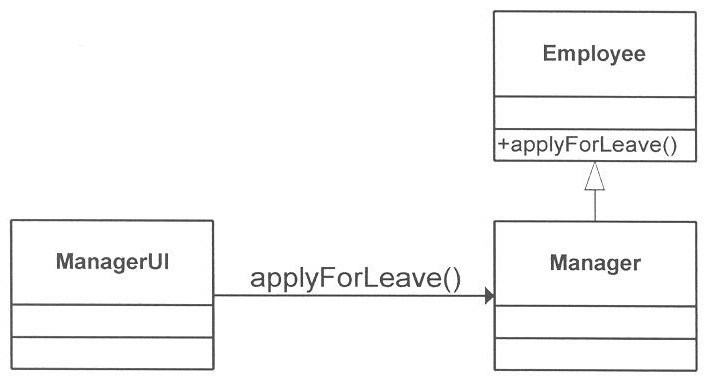
    Continuing the example from the previous section, the class zManager inherits the method ’applyForLeave’ from zEmployee.

    Figure 3: Manager inherits behaviour from Employee

    In this example, the UI component zManagerUI calls zManager to ’applyForLeave’. The call (know as a delegation) within zManagerUI is implemented in Zim like this:

    zManager(’applyForLeave’, ’’)

    Note that viSelf is blank because the call is made across the hierarchy (a delegated call) not up the tree (an inherited call). The code for zManager appears below. Notice that the method ’applyForLeave’ does not exist in zManager and the method dispatcher calls zEmployee using the otherwise component of the case statement.

    Note that zEmployee is an abstract class. This means that the class will only be executed using an inheritance call, not a delegated call. zEmployee is an abstraction of zManager.

    The code for zManager is shown below followed by zEmployee.

    %—————————————————————–
    method mAssignEmployee(viSelf)
    add ManagerEmployee from aManager
    endMethod

    %—————————————————————–
    method mpManager(viMethod, inout vtSelf)
    change aManager let pMethod = viMethod
    let vtSelf = {vtSelf where vtSelf < ’’, ’zManager’}
    endMethod

    %—————————————————————–
    method mpFinalize(viSelf)
    endMethod

    %=================================================================
    class zManager(viMethod, viSelf)
    mpManager(viMethod,viSelf)
    %Methods
    case
    when aManager.pMethod = ‘assignEmployee’
      mAssignEmployee(viSelf)
    otherwise
    zEmployee(aManager.pMethod, viSelf)
    endCase
    mpFinalize(viSelf)
    endClass

    %—————————————————————–
    method mApplyForLeave(viSelf)
    change employee where ID = aEmployee.ID let ApplyForLeave=$true
    endmethod

    %—————————————————————–
    method mpEmployee(viMethod,viSelf)
    let = $replace(viSelf, 1, 1 a)
    change aEmployee from a# let aEmployee.pMethod = viMethod
    endMethod

    %—————————————————————–
    method mpFinalize(viSelf)
    change a# from aEmployee
    endMethod

    %=================================================================
    class zEmployee(viMethod, viSelf)
    mpEmployee(viMethod,viSelf)
    case
    when aManager.pMethod = ‘applyForLeave’
      mApplyForLeave(viSelf)
    endCase
    mpFinalize(viSelf)
    endClass

    There are five points to note in the code of zEmployee.

    1. mpEmployee moves the attributes across from aManager to aEmployee.

    2. zEmployee manipulates the structure of aEmployee only.

    3. mFinalize moves the modified attributes back to aManager.

    An example of a class library using a complete run-time inheritance mechanism is the ZCL.

    Please remember there are other variations of run-time inheritance that can be implemented. For example inheritance may be table driven. A child looks up a parent in a table and then the class is made to the parent. The parent still needs to know the child (for transferring of attribute values) and this is passed via viSelf.

    Packages

    Packages are a means to group classes into logical groups. The equivalent in Zim is the object directories. The directory allows you to manage a large group of classes and avoid naming conflicts. Classes are created in a directory exactly the same as other Zim objects.


    Zim Constants

    The following table contains a list of the Zim constants, types, locations, and values.

    ConstNameConstTypeDirNameConstValue
    Black
    Blue
    Green
    Cyan
    Red
    Magenta
    Brown
    LightGrey
    DarkGrey
    LightBlue
    LightGreen
    LightCyan
    LightRed
    LightMagenta
    Yellow
    White
    numeric
    numeric
    numeric
    numeric
    numeric
    numeric
    numeric
    numeric
    numeric
    numeric
    numeric
    numeric
    numeric
    numeric
    numeric
    numeric
    ZIM
    ZIM
    ZIM
    ZIM
    ZIM
    ZIM
    ZIM
    ZIM
    ZIM
    ZIM
    ZIM
    ZIM
    ZIM
    ZIM
    ZIM
    ZIM
    1
    2
    3
    4
    5
    6
    7
    8
    9
    10
    11
    12
    13
    14
    15
    16
    Escape
    Esc
    char
    char
    ZIM
    ZIM
    ESCAPE
    ESCAPE
    F1
    F2
    F3
    F4
    F5
    F6
    F7
    F8
    F9
    F10
    F11
    F12
    F13
    F14
    F15
    F16
    F17
    F18
    F19
    F20
    F21
    F22
    F23
    F24
    F25
    F26
    F27
    F28
    F29
    F30
    F31
    F32
    F33
    F34
    F35
    F36
    F37
    F38
    F39
    F40
    F41
    F42
    F43
    F44
    F45
    F46
    F47
    F48
    F49
    F50
    F51
    F52
    F53
    F54
    F55
    F56
    F57
    F58
    F59
    F60
    F61
    F62
    F63
    F64
    F65
    F66
    F67
    F68
    F69
    F70
    F71
    F72
    F73
    F74
    F75
    F76
    F77
    F78
    F79
    F80
    F81
    F82
    F83
    F84
    F85
    F86
    F87
    F88
    F89
    F90
    F91
    F92
    F93
    F94
    F95
    F96
    F97
    F98
    F99
    F100
    char
    char
    char
    char
    char
    char
    char
    char
    char
    char
    char
    char
    char
    char
    char
    char
    char
    char
    char
    char
    char
    char
    char
    char
    char
    char
    char
    char
    char
    char
    char
    char
    char
    char
    char
    char
    char
    char
    char
    char
    char
    char
    char
    char
    char
    char
    char
    char
    char
    char
    char
    char
    char
    char
    char
    char
    char
    char
    char
    char
    char
    char
    char
    char
    char
    char
    char
    char
    char
    char
    char
    char
    char
    char
    char
    char
    char
    char
    char
    char
    char
    char
    char
    char
    char
    char
    char
    char
    char
    char
    char
    char
    char
    char
    char
    char
    char
    char
    char
    char
    ZIM
    ZIM
    ZIM
    ZIM
    ZIM
    ZIM
    ZIM
    ZIM
    ZIM
    ZIM
    ZIM
    ZIM
    ZIM
    ZIM
    ZIM
    ZIM
    ZIM
    ZIM
    ZIM
    ZIM
    ZIM
    ZIM
    ZIM
    ZIM
    ZIM
    ZIM
    ZIM
    ZIM
    ZIM
    ZIM
    ZIM
    ZIM
    ZIM
    ZIM
    ZIM
    ZIM
    ZIM
    ZIM
    ZIM
    ZIM
    ZIM
    ZIM
    ZIM
    ZIM
    ZIM
    ZIM
    ZIM
    ZIM
    ZIM
    ZIM
    ZIM
    ZIM
    ZIM
    ZIM
    ZIM
    ZIM
    ZIM
    ZIM
    ZIM
    ZIM
    ZIM
    ZIM
    ZIM
    ZIM
    ZIM
    ZIM
    ZIM
    ZIM
    ZIM
    ZIM
    ZIM
    ZIM
    ZIM
    ZIM
    ZIM
    ZIM
    ZIM
    ZIM
    ZIM
    ZIM
    ZIM
    ZIM
    ZIM
    ZIM
    ZIM
    ZIM
    ZIM
    ZIM
    ZIM
    ZIM
    ZIM
    ZIM
    ZIM
    ZIM
    ZIM
    ZIM
    ZIM
    ZIM
    ZIM
    ZIM
    F1
    F2
    F3
    F4
    F5
    F6
    F7
    F8
    F9
    F10
    F11
    F12
    F13
    F14
    F15
    F16
    F17
    F18
    F19
    F20
    F21
    F22
    F23
    F24
    F25
    F26
    F27
    F28
    F29
    F30
    F31
    F32
    F33
    F34
    F35
    F36
    F37
    F38
    F39
    F40
    F41
    F42
    F43
    F44
    F45
    F46
    F47
    F48
    F49
    F50
    F51
    F52
    F53
    F54
    F55
    F56
    F57
    F58
    F59
    F60
    F61
    F62
    F63
    F64
    F65
    F66
    F67
    F68
    F69
    F70
    F71
    F72
    F73
    F74
    F75
    F76
    F77
    F78
    F79
    F80
    F81
    F82
    F83
    F84
    F85
    F86
    F87
    F88
    F89
    F90
    F91
    F92
    F93
    F94
    F95
    F96
    F97
    F98
    F99
    F100
    Home
    JumpDown
    JumpLeft
    JumpRight
    JumpUp
    PageDown
    PageUp
    TabBack
    TabForward
    char
    char
    char
    char
    char
    char
    char
    char
    char
    ZIM
    ZIM
    ZIM
    ZIM
    ZIM
    ZIM
    ZIM
    ZIM
    ZIM
    HOME
    JUMPDOWN
    JUMPLEFT
    JUMPRIGHT
    JUMPUP
    PAGEDOWN
    PAGEUP
    TABBACK
    TABFORWARD
    Button1
    Button2
    Button3
    Button4
    Button5
    Button6
    char
    char
    char
    char
    char
    char
    ZIM
    ZIM
    ZIM
    ZIM
    ZIM
    ZIM
    BUTTON1
    BUTTON2
    BUTTON3
    BUTTON4
    BUTTON5
    BUTTON6
    CActiveBorder
    CActiveCaption
    CAppWorkSpace
    CWindowBackground
    CButtonFace
    CButtonShadow
    CButtonText
    CCaptionText
    CGrayText
    CHighlightColor
    CHighlightText
    CInactiveBorder
    CInactiveCaption
    CMenuColor
    CMenuTextColor
    CScrollBarColor
    CWindowFrame
    CWindowText
    CInactivCaptionTxt
    CButtonHighlight
    CWindowColor
    numeric
    numeric
    numeric
    numeric
    numeric
    numeric
    numeric
    numeric
    numeric
    numeric
    numeric
    numeric
    numeric
    numeric
    numeric
    numeric
    numeric
    numeric
    numeric
    numeric
    numeric
    ZIM
    ZIM
    ZIM
    ZIM
    ZIM
    ZIM
    ZIM
    ZIM
    ZIM
    ZIM
    ZIM
    ZIM
    ZIM
    ZIM
    ZIM
    ZIM
    ZIM
    ZIM
    ZIM
    ZIM
    ZIM
    37
    36
    35
    34
    33
    32
    31
    30
    29
    28
    27
    26
    25
    24
    23
    22
    21
    20
    19
    18
    17
    $CurrentODRevision
    $CurrentODVersion
    cEOLNTRANSLATE
    $CurrentCOVersion
    $CurrentDCRevision
    $CurrentDCVersion
    char
    char
    char
    char
    char
    char
    ZIMServices
    ZIMServices
    $Utils
    $DevCen
    $DevCen
    $DevCen
    1.0
    6.1


    1
    1.0
    6.1

    Alt0
    Alt1
    Alt2
    Alt3
    Alt4
    Alt5
    Alt6
    Alt7
    Alt8
    Alt9
    AltA
    AltB
    AltC
    AltD
    AltE
    AltEqual
    AltF
    AltF1
    AltF10
    AltF11
    AltF12
    AltF2
    AltF3
    AltF4
    AltF5
    AltF6
    AltF7
    AltF8
    AltF9
    AltG
    AltH
    AltI
    AltJ
    AltK
    AltL
    AltM
    AltMinus
    AltN
    AltO
    AltP
    AltQ
    AltR
    AltS
    AltT
    AltU
    AltV
    AltW
    AltX
    AltY
    AltZ
    char
    char
    char
    char
    char
    char
    char
    char
    char
    char
    char
    char
    char
    char
    char
    char
    char
    char
    char
    char
    char
    char
    char
    char
    char
    char
    char
    char
    char
    char
    char
    char
    char
    char
    char
    char
    char
    char
    char
    char
    char
    char
    char
    char
    char
    char
    char
    char
    char
    char
    $DeployServices
    $DeployServices
    $DeployServices
    $DeployServices
    $DeployServices
    $DeployServices
    $DeployServices
    $DeployServices
    $DeployServices
    $DeployServices
    $DeployServices
    $DeployServices
    $DeployServices
    $DeployServices
    $DeployServices
    $DeployServices
    $DeployServices
    $DeployServices
    $DeployServices
    $DeployService
    $DeployServices
    $DeployServices
    $DeployServices
    $DeployServices
    $DeployServices
    $DeployServices
    $DeployServices
    $DeployServices
    $DeployServices
    $DeployServices
    $DeployServices
    $DeployServices
    $DeployServices
    $DeployServices
    $DeployServices
    $DeployServices
    $DeployServices
    $DeployServices
    $DeployServices
    $DeployServices
    $DeployServices
    $DeployServices
    $DeployServices
    $DeployServices
    $DeployServices
    $DeployServices
    $DeployServices
    $DeployServices
    $DeployServices
    $DeployServices
    F50
    F41
    F42
    F43
    F44
    F45
    F46
    F47
    F48
    F49
    F63
    F76
    F74
    F65
    F55
    F52
    F66
    F31
    F40
    F83
    F84
    F32
    F33
    F34
    F35
    F36
    F37
    F38
    F39
    F67
    F68
    F60
    F69
    F70
    F71
    F78
    F51
    F77
    F61
    F62
    F53
    F56
    F64
    F57
    F59
    F75
    F54
    F73
    F58
    F72
    ATTROEFTYPE
    ATTROFOEFTYPE
    char
    char
    $CompDevCen
    $CompDevCen
    FIELD
    FIELDOF
    BTN_BITMAP
    BTN_ICON
    BTN_MFILE
    BTN_TEXT
    numeric
    numeric
    numeric
    numeric
    $CompWinPtr
    $CompWinPtr
    $CompWinPtr
    $CompWinPtr
    3
    2
    4
    1
    c10X14
    c11X17
    cA3
    cA4
    cA4SMALL
    cA5
    cApplicationClass
    cAVAILABLE
    cB4
    cB5
    cBIN_AUTO
    cBIN_CASSETTE
    cBIN_ENVELOPE
    cBIN_ENVMANUAL
    cBIN_LARGECAPACITY
    cBIN_LARGEFMT
    cBIN_LOWER
    cBIN_MANUAL
    cBIN_MIDDLE
    cBIN_SMALLFMT
    cBIN_TRACTOR
    cBIN_UPPER
    cBITMAP
    cCHARTLEN
    cChildClass
    cCLICK
    cCOLOR
    cCSHEET
    cDEFAULT
    cDependentClass
    cDOUBLECLICK
    cDOWNLOAD
    cDRAFT
    cDSHEET
    cENV_10
    cENV_11
    cENV_12
    cENV_14
    cENV_9
    cENV_B4
    cENV_B5
    cENV_B6
    cENV_C3
    cENV_C4
    cENV_C5
    cENV_C6
    cENV_C65
    cENV_DL
    cENV_ITALY
    cENV_MONARCH
    cENV_PERSONAL
    cESHEET
    cEVACCELERATOR
    cEVCLICK
    cEVCLOSED
    cEVDOUBLECLICK
    cEVLOSTFOCUS
    cEVLOSTFOCUSMOD
    cEVMODIFIED
    cEVTFORMFIELD
    cEVTWINDOW
    cEXECUTIVE
    cFFLDTSEP
    cFFMINTLEN
    cFFOLD_GERMAN_LGL
    cFFOLD_GERMAN_STD
    cFFOLD_US
    cFOLIO
    cGEN_DOC
    cGEN_ENT
    cGEN_REL
    cGOTFOCUS
    cHIGH
    cHORIZONTAL
    cIMP_FF
    cIMP_FORM
    cIMP_ITEM
    cIMP_MENU
    cLANDSCAPE
    cLEDGER
    cLEGAL
    cLETTER
    cLETTERSMALL
    cLOGICAL_INCHS
    cLOW
    CMAHeaderTag_001
    cMEDIUM
    cMINCOL
    cMINROW
    cMODIFIED
    cMONOCHROME
    cNotConnected
    cNOTE
    CONSTOBJTYPE
    CONSTSOEFTYPE
    cPIXELS
    cPOINTS
    cPORTRAIT
    cQUARTO
    cQUESTIONMSG
    csBLANK
    csCOMBO
    csENTRY
    csFILLCOLOR
    csFORM
    csFRAME
    csGRAPHIC
    cSHADOWDEFAULT
    csIMAGE
    cSIMPLEX
    csLABEL
    csLIST
    csLOADFORM
    csMENU
    csMENUITEM
    csOBB
    csOLE
    csOPTION
    csPENCOLOR
    csPUSH
    cSQLColumnInput
    cSQLColumnOutput
    cSQLColumnResult
    csREADY
    csSAVEFORM
    csSCROLL
    cSTATEMENT
    csTOGGLE
    cSUBDEV
    csWINDOW
    cTABLOID
    cTEXT
    cTOGGLE_OFF
    cTOGGLE_ON
    cTRANSFIELD
    CtrlBackTab
    char
    char
    char
    char
    char
    char
    numeric
    numeric
    char
    char
    char
    char
    char
    char
    char
    char
    char
    char
    char
    char
    char
    char
    char
    numeric
    numeric
    char
    char
    char
    char
    numeric
    char
    char
    char
    char
    char
    char
    char
    char
    char
    char
    char
    char
    char
    char
    char
    char
    char
    char
    char
    char
    char
    char
    char
    char
    char
    char
    char
    char
    char
    char
    char
    char
    numeric
    numeric
    char
    char
    char
    char
    char
    char
    char
    char
    char
    char
    char
    char
    char
    char
    char
    char
    char
    char
    char
    char
    char
    char
    char
    numeric
    numeric
    char
    char
    numeric
    char
    char
    char
    char
    char
    char
    char
    numeric
    char
    char
    char
    char
    char
    char
    char
    numeric
    char
    char
    char
    char
    char
    char
    char
    char
    char
    char
    char
    char
    Numeric
    Numeric
    Numeric
    char
    char
    char
    char
    char
    char
    char
    char
    numeric
    char
    char
    char
    char
    $DeployServices
    $DeployServices
    $DeployServices
    $DeployServices
    $DeployServices
    $DeployServices
    $DeployServices
    $CompWinPtr
    $DeployServices
    $DeployServices
    $DeployServices
    $DeployServices
    $DeployServices
    $DeployServices
    $DeployServices
    $DeployServices
    $DeployServices
    $DeployServices
    $DeployServices
    $DeployServices
    $DeployServices
    $DeployServices
    $DeployServices
    $CompDevCen
    $DeployServices
    $CompWinPtr
    $DeployServices
    $DeployServices
    $DeployServices
    $DeployServices
    $CompWinPtr
    $DeployServices
    $DeployServices
    $DeployServices
    $DeployServices
    $DeployServices
    $DeployServices
    $DeployServices
    $DeployServices
    $DeployServices
    $DeployServices
    $DeployServices
    $DeployServices
    $DeployServices
    $DeployServices
    $DeployServices
    $DeployServices
    $DeployServices
    $DeployServices
    $DeployServices
    $DeployServices
    $DeployServices
    $CompWinPtr
    $CompWinPtr
    $CompWinPtr
    $CompWinPtr
    $CompWinPtr
    $CompWinPtr
    $CompWinPtr
    $CompWinPtr
    $CompWinPtr
    $DeployServices
    $CompDevCen
    $CompDevCen
    $DeployServices
    $DeployServices
    $DeployServices
    $DeployServices
    $CompWinPtr
    $CompWinPtr
    $CompWinPtr
    $CompWinPtr
    $DeployServices
    $DeployServices
    $CompWinPtr
    $CompWinPtr
    $CompWinPtr
    $CompWinPtr
    $DeployServices
    $DeployServices
    $DeployServices
    $DeployServices
    $DeployServices
    $DeployServices
    $DeployServices
    $CompDevCen
    $DeployServices
    $CompWinPtr
    $CompWinPtr
    $CompWinPtr
    $DeployServices
    $CompDevCen
    $DeployServices
    $DevCen
    $CompDevCen
    $DeployServices
    $DeployServices
    $DeployServices
    $DeployServices
    $CompDevCen
    $CompWinPtr
    $CompWinPtr
    $CompWinPtr
    $CompWinPtr
    $CompWinPtr
    $CompWinPtr
    $CompWinPtr
    $CompWinPtr
    $CompWinPtr
    $DeployServices
    $CompWinPtr
    $CompWinPtr
    $CompWinPtr
    $CompWinPtr
    $CompWinPtr
    $CompWinPtr
    $CompWinPtr
    $CompWinPtr
    $CompWinPtr
    $CompWinPtr
    $CompDevCen
    $CompDevCen
    $CompDevCen
    $CompWinPtr
    $CompWinPtr
    $CompWinPtr
    $DeployServices
    $CompWinPtr
    $DeployServices
    $CompWinPtr
    $DeployServices
    $DeployServices
    $DeployServices
    $DeployServices
    $CompWinPtr
    $DeployServices
    16
    17
    8
    9
    10
    11
    37
    12
    13
    7
    14
    5
    6
    11
    10
    2
    4
    3
    9
    8
    1
    1
    100
    1
    widgetevent
    2
    24
    2
    widgetevent
    2
    -1
    25
    20
    21
    22
    23
    19
    33
    34
    35
    29
    30
    28
    31
    32
    27
    36
    37
    38
    26
    Accelerator
    Click
    Closed
    Doubleclick
    LostFocus
    LostFocusModified
    Modified
    FormField
    Window
    7
    100
    300
    41
    40
    39
    14
    D
    E
    R
    enterfield
    -4
    3
    B
    A
    D
    C
    2
    4
    5
    1
    2
    3
    -2
    __!!_CMAHeaderTag_001_!!__
    -3
    2
    2
    WGMODIFIED
    1
    8275
    18
    Constant
    CONSTANT
    2
    1
    15
    4
    [blank]
    Combo
    Entry
    Fill
    Color
    Form
    Frame
    Graphic
    Image
    1
    Label
    List
    Loading
    Form
    Menu
    Item
    OBB
    OLE
    Option
    Pen
    Color
    Push
    1
    4
    3
    Ready
    Saving
    Form
    Scroll
    6
    Toggle
    3
    Window
    3
    2
    1
    transmitted
    CTLTABBACK
    CtrlF1
    CtrlF10
    CtrlF11
    CtrlF12
    CtrlF2
    CtrlF3
    CtrlF4
    CtrlF5
    CtrlF6
    CtrlF7
    CtrlF8
    CtrlF9
    CtrlTab
    char
    char
    char
    char
    char
    char
    char
    char
    char
    char
    char
    char
    char
    $DeployServices
    $DeployServices
    $DeployServices
    $DeployServices
    $DeployServices
    $DeployServices
    $DeployServices
    $DeployServices
    $DeployServices
    $DeployServices
    $DeployServices
    $DeployServices
    $DeployServices
    F21
    F30
    F81
    F82
    F22
    F23
    F24
    F25
    F26
    F27
    F28
    F29
    CTLTAB
    cTWIPS
    cUNAVAILABLE
    cUNNAMED
    cUSER
    cUSERGBCOLOR
    cVERTICAL
    cWDGCLICK
    cWDGEVENT
    cWINDOWEVENT
    cWNCLOSE
    char
    numeric
    char
    char
    numeric
    char
    char
    char
    char
    char
    $DeployServices
    $CompWinPtr
    $CompWinPtr
    $DeployServices
    $CompWinPtr
    $DeployServices
    $CompWinPtr
    $CompWinPtr
    $CompWinPtr
    $CompWinPtr
    1
    48
    [unnamed]
    256
    99
    2
    WGCLICK
    widgetevent
    windowevent
    WNCLOSE
    DFOBJTYPE
    DFSOEFTYPE
    DIROBJTYPE
    DIRSOEFTYPE
    DISPOBJTYPE
    DISPSOEFTYPE
    DOCOBJTYPE
    DOMOEFTYPE
    DPSBREAK
    DPSERROR
    DPSNOTENTERED
    DPSOK
    DFSOEFTYPE
    DIROBJTYPE
    DIRSOEFTYPE
    DISPOBJTYPE
    DISPSOEFTYPE
    DOCOBJTYPE
    DOMOEFTYPE
    DPSBREAK
    DPSERROR
    DPSNOTENTERED
    DPSOK
    char


    char

    char

    char
    char
    numeric
    numeric
    numeric
    numeric

    char

    char

    char
    char
    numeric
    numeric
    numeric
    numeric

    $DevCen
    $CompDevCen
    $DevCen
    $CompDevCen
    $DevCen
    $CompDevCen
    $DevCen
    $CompDevCen
    $DeployServices
    $DeployServices
    $DeployServices
    $DeployServices
    $CompDevCen
    $DevCen
    $CompDevCen
    $DevCen
    $CompDevCen
    $DevCen
    $CompDevCen
    $DeployServices
    $DeployServices
    $DeployServices
    $DeployServices
    DisplayForm
    DISPLAYFORM
    Directory
    DIRECTORY
    Display
    DISPLAY
    Document
    DOMAIN
    1
    2
    100007
    DISPLAYFORM
    Directory
    DIRECTORY
    Display
    DISPLAY
    Document
    DOMAIN
    1
    2
    100007
    0
    ENTOBJTYPE
    ENTOEFTYPE
    ERMSGGTONEOBJ
    ERMSGINVALIDTARG
    ERMSGNOOBJ
    ERMSGNOTARGDIR
    ERMSGNOTDOCOBJ
    ERMSGOBJLOCKED
    ERMSGOVRWRTDOC
    errADDDELETED
    errDEADLOCK
    errDEFMESSAGE
    errDEFPROGRESS
    errDELETEDATA
    errDUPLICATEKEY
    errDUPLKEY
    errINVALIDDATA
    errLOADING
    errMEMBERDELETED
    errNOMATCHRECORD
    errNOMSG
    errNORECORDSFOUND
    errNOTIMPLEMENTED
    errREQUIREDATA
    errRequireDetail
    errSAVEDATA
    errUNKNOWNACTION
    errUNKNOWNSTATE
    errUNKNOWNVIEW
    errUSERBREAK
    char
    char
    char
    numeric
    char
    char
    char
    char
    char
    numeric
    numeric
    numeric
    numeric
    numeric
    numeric
    numeric
    numeric
    numeric
    numeric
    numeric
    numeric
    numeric
    numeric


    numeric
    numeric

    $DevCen
    $CompDevCen
    $DevCen
    $DevCen
    $DevCen
    $DevCen
    $DevCen
    $DevCen
    $DevCen
    $DeployServices
    $DeployServices
    $DeployServices
    $DeployServices
    $DeployServices
    $DeployServices
    $DeployServices
    $DeployServices
    $DeployServices
    $DeployServices
    $DeployServices
    $DeployServices
    $DeployServices
    $DeployServices
    $DeployServices
    $DeployServices
    $DeployServices
    $DeployServices
    $DeployServices
    $DeployServices
    $DeployServices
    EntitySet
    ENTITYSET
    100001
    100006
    100000
    100005
    100002
    100004
    100003
    10
    2010
    1
    2
    15
    8007
    8007
    13
    22
    8006
    21
    -1
    20
    19
    14
    31
    11
    12
    18
    17
    16
    FFNAMEOEFTYPE
    FFOBJTYPE
    FFSOEFTYPE
    FLDOBJTYPE
    FNAMEOEFTYPE
    FORMOBJTYPE
    FORMSOEFTYPE
    FT_COMBO_BOX
    FT_ENTRY
    FT_FRAME
    FT_GRAPHIC
    FT_IMAGE
    FT_LABEL
    FT_LIST_BOX
    FT_MENU
    FT_MENU_ITEM
    FT_OLE
    FT_OPT_BTN_BOX
    FT_PUSH_BTN
    FT_SCROLL_BAR
    FT_SEP_ITEM
    FT_TOGGLE_BTN
    char
    char


    char
    char
    char

    char
    char
    char
    char
    char
    char
    char
    char
    char
    char
    char
    char
    char
    char
    char

    $CompDevCen
    $DevCen
    $CompDevCen
    $DevCen
    $CompDevCen
    $DevCen
    $CompDevCen
    $CompWinPtr
    $CompWinPtr
    $CompWinPtr
    $CompWinPtr
    $CompWinPtr
    $CompWinPtr
    $CompWinPtr
    $CompWinPtr
    $CompWinPtr
    $CompWinPtr
    $CompWinPtr
    $CompWinPtr
    $CompWinPtr
    $CompWinPtr
    $CompWinPtr
    FORMFIELDNAME
    FormField
    FORMFIELD
    Field
    FIELDNAME
    Form
    FORM
    C
    V
    F
    F
    I
    P
    L
    X
    M
    E
    O
    B
    S
    U
    T
    GEROEFTYPE
    GRF_LINE
    GRF_RECT
    char
    numeric
    numeric
    $CompDevCen
    $CompWinPtr
    $CompWinPtr
    GERUND
    1
    2
    IMG_BITMAP
    IMG_ICON
    IMG_MFILE
    infADDEDMSG
    infAddingMsg
    infCHANGEDMSG
    infChangingMsg
    infDELETEDMSG
    infDeletingMsg
    infDTLADDEDMSG
    infDTLDELETEDMSG
    infFOUNDMSG
    INSTOFOEFTYPE
    numeric
    numeric
    numeric
    numeric
    numeric
    numeric
    numeric
    numeric
    numeric
    numeric
    numeric
    numeric
    char
    $CompWinPtr
    $CompWinPtr
    $CompWinPtr
    $DeployServices
    $DeployServices
    $DeployServices
    $DeployServices
    $DeployServices
    $DeployServices
    $DeployServices
    $DeployServices
    $DeployServices
    $CompDevCen
    1
    2
    3
    27
    34
    25
    32
    26
    33
    29
    30
    28
    INSTANCEOF
    MENU_BITMAP
    MENU_TEXT
    MENUOBJTYPE
    MENUSOEFTYPE
    MQerrEMPTY
    MQerrNOOP
    MQerrNOTFOUND
    MQerrOVERFLOW
    numeric
    numeric
    char


    char
    char
    char
    char

    $CompWinPtr
    $CompWinPtr
    $DevCen
    $CompDevCen
    $DeployServices
    $DeployServices
    $DeployServices
    $DeployServices
    2
    1
    Menu
    MENU
    -9103
    -9102
    -9100
    -9101
    NULL_WDG_IDnumeric$CompWinPtr0
    opAdd
    opAddAll
    opAddDetail
    opClearDetail
    opComputeDetail
    opDelete
    opDeleteAllDetail
    opDeleteDetail
    opDuplicate
    opFind
    opInit
    opPaint
    opPeekKey
    opPrintData
    opQuery
    opRename
    opRestoreDetail
    opSelect
    opSort
    opUpdate
    osDOS
    osOS2
    osQNX
    osUnix
    osUnixSCO
    osUnixSun
    osVMS
    osWin3
    numeric
    Numeric
    numeric
    numeric
    numeric
    numeric
    numeric
    numeric
    numeric
    char
    numeric
    numeric
    char
    numeric
    numeric
    numeric
    Numeric
    char
    numeric
    numeric
    Numeric
    Numeric
    Numeric
    Numeric
    Numeric
    Numeric
    Numeric
    Numeric
    $DeployServices
    $DeployServices
    $DeployServices
    $DeployServices
    $DeployServices
    $DeployServices
    $DeployServices
    $DeployServices
    $DeployServices
    $DeployServices
    $DeployServices
    $CompDevCen
    $DeployServices
    $DeployServices
    $DeployServices
    $DeployServices
    $DeployServices
    $DeployServices
    $DeployServices
    $DeployServices
    _ZIMServices
    _ZIMServices
    _ZIMServices
    _ZIMServices
    _ZIMServices
    _ZIMServices
    _ZIMServices
    _ZIMServices
    2
    26
    23
    20
    21
    3
    24
    22
    7
    8
    7000
    10
    12
    4
    6
    25
    9
    5
    1
    7
    8
    6
    3
    2
    4
    5
    11
    PMerrEMPTY
    PMerrNOOP
    PMerrNOTFOUND
    PMerrOVERFLOW
    char
    char
    char
    char
    $DeployServices
    $DeployServices
    $DeployServices
    $DeployServices
    -9003
    -9002
    -9000
    -9001
    questPRINTSET
    questPRINTWIN
    numeric
    numeric
    $DeployServices
    $DeployServices
    24
    23
    RELOBJTYPE
    RELOEFTYPE
    ROLEFOROEFTYPE
    ROLEOBJTYPE
    ROLEOEFTYPE
    char
    char
    char
    char
    char
    $DevCen
    $CompDevCen
    $CompDevCen
    $DevCen
    $CompDevCen
    Relationship
    RELATIONSHIP
    ROLEFOR
    Role
    ROLE
    SBR_HORIZ
    SBR_VERT
    SETOBJTYPE
    SETSOEFTYPE
    numeric
    numeric
    char
    $CompWinPtr
    $CompWinPtr
    $DevCen
    $CompDevCen
    1
    2
    Set
    NAMEDSET
    ShiftF1
    ShiftF10
    ShiftF11
    ShiftF12
    ShiftF2
    ShiftF3
    ShiftF4
    ShiftF5
    ShiftF6
    ShiftF7
    ShiftF8
    ShiftF9
    char
    char
    char
    char
    char
    char
    char
    char
    char
    char
    char
    char
    $DeployServices
    $DeployServices
    $DeployServices
    $DeployServices
    $DeployServices
    $DeployServices
    $DeployServices
    $DeployServices
    $DeployServices
    $DeployServices
    $DeployServices
    $DeployServices
    F11
    F20
    F79
    F80
    F12
    F13
    F14
    F15
    F16
    F17
    F18
    F19
    stBROWSE
    STDOCOEFTYPE
    stEDIT
    stEDITMODIFIED
    stNEW
    stNEWMODIFIED
    stNULL
    $DeployServices
    Null
    char$DeployServices
    $CompDevCen
    $DeployServices
    $DeployServices
    $DeployServices
    $DeployServices
    $DeployServices
    Browse
    DOCUMENT
    Edit
    EditModified
    New
    NewModified
    Null
    TOG_3STATE
    TOG_BITMAP
    TOG_CHECK
    TOG_RADIO
    numeric
    numric
    numeric
    numeric
    $CompWinPtr
    $CompWinPtr
    $CompWinPtr
    $CompWinPtr
    3
    3
    1
    2
    VAROBJTYPE
    VARSOEFTYPE
    vwFORM
    vwNULL
    vwSHEET
    vwTABLE
    char$DevCen
    $CompDevCen
    $DeployServices
    $DeployServices
    $DeployServices
    $DeployServices
    Variable
    VARIABLE
    Form
    Null
    Sheet
    Table
    WINOBJTYPE
    WINSOEFTYPE
    WO_HORIZ
    WO_VERT
    char


    numeric
    numeric

    $DevCen
    $CompDevCen
    $CompWinPtr
    $CompWinPtr
    Window
    WINDOW
    1
    2
    ZOM0OPTION
    ZOM1OPTION
    ZOM2OPTION
    ZOM3OPTION
    ZOM4OPTION
    ZOM5OPTION
    ZOM6OPTION
    ZOM7OPTION
    ZOM8OPTION
    ZOM9OPTION
    ZOMAOPTION
    ZOMBOPTION
    ZOMBREAK
    ZOMCLCURRENT
    ZOMCLINTER
    ZOMCLLIST
    ZOMCLMINUS
    ZOMCLOPTION
    ZOMCLTARGET
    ZOMCLUNION
    ZOMCOPTION
    ZOMDEPDIROWNER
    ZOMDOPTION
    ZOMEOPTION
    ZOMERRIGNORE
    ZOMERROR
    ZOMERRORLEVEL
    ZOMFLAGEXPLODE
    ZOMFLAGTRUE
    ZOMFOPTION
    ZOMGOPTION
    ZOMHOPTION
    ZOMINFOLEVEL
    ZOMIOPTION
    ZOMJOPTION
    ZOMKOPTION
    ZOMLOPTION
    ZOMMACRO
    ZOMMOPTION
    ZOMNOEXPLODE
    ZOMNOPTION
    ZOMNOTENTERED
    ZOMOBJCORRUPT
    ZOMOK
    ZOMOOPTION
    ZOMOPTIONORDA
    ZOMPOPTION
    ZOMQOPTION
    ZOMRCRTEXPLODE
    ZOMROPTION
    ZOMSOPTION
    ZOMSTATOBJLOCKED
    ZOMSYSTEMLEVEL
    ZOMTOPTION
    ZOMTPBASE
    ZOMTPDEP
    ZOMUOPTION
    ZOMVOPTION
    ZOMWARNINGLEVEL
    ZOMWOPTION
    ZOMXOPTION
    ZOMYOPTION
    ZOMZOPTION
    char
    char
    char
    char
    char
    char
    char
    char
    char
    char
    char
    char
    numeric
    char
    char
    char
    char
    char
    char
    char
    char
    char
    char
    char
    char
    numeric
    numeric
    char
    char
    char
    char
    char
    numeric
    char
    char
    char
    char
    char
    char
    char
    char
    numeric
    char
    numeric
    char
    numeric
    char
    char
    char
    char
    char
    numeric
    numeric
    char
    char
    char
    char
    char
    numeric
    char
    char
    char
    char
    $DevCen
    $DevCen
    $DevCen
    $DevCen
    $DevCen
    $DevCen
    $DevCen
    $DevCen
    $DevCen
    $DevCen
    $DevCen
    $DevCen
    $DevCen
    $CompDevCen
    $CompDevCen
    $DevCen
    $CompDevCen
    $CompDevCen
    $CompDevCen
    $CompDevCen
    $DevCen
    $DevCen
    $DevCen
    $DevCen
    $DevCen
    $DevCen
    $DevCen
    $DevCen
    $DevCen
    $DevCen
    $DevCen
    $DevCen
    $DevCen
    $DevCen
    $DevCen
    $DevCen
    $DevCen
    $DevCen
    $DevCen
    $DevCen
    $DevCen
    $DevCen
    $DevCen
    $DevCen
    $DevCen
    $DevCen
    $DevCen
    $DevCen
    $DevCen
    $DevCen
    $DevCen
    $DevCen
    $DevCen
    $DevCen
    $DevCen
    $DevCen
    $DevCen
    $DevCen
    $DevCen
    $DevCen
    $DevCen
    $DevCen
    $DevCen
    1
    2
    3
    4
    5
    6
    7
    8
    9
    10
    11
    12
    1
    .
    ^
    ,

    ;
    >
    +
    13
    D
    14
    15
    I
    2
    3
    1
    Y
    16
    17
    18
    1
    19
    20
    21
    22
    M
    23
    24
    100007
    C
    25
    65
    26
    27
    2
    28
    29
    1
    4
    30
    Y
    D
    31
    31
    2
    33
    34
    35
    36
    en_CAEnglish