
Dependency Explosion

Dependency Explosion is the process of finding the objects which depend on (i.e., uses) a given object, and so on up the dependency tree. There are three different kinds of explosion: immediate, creation, and program.

As an example, let’s suppose we want list all of the objects that use Customers:

ZOMList Customers +x

The result is the set of objects which use Customers directly, regardless of whether the dependency is a creation dependency or a program dependency. The diagram below highlights the selected objects:


Objects Selected by “Customers +x”

This selects only objects that use Customers explicitly by means of a creation dependency or a program dependency. The objects that use these dependent objects are ignored.

Now suppose we want to list only the objects that use Customers by means of a creation dependency:

ZOMList Customers +x t

The diagram below highlights the selected objects:
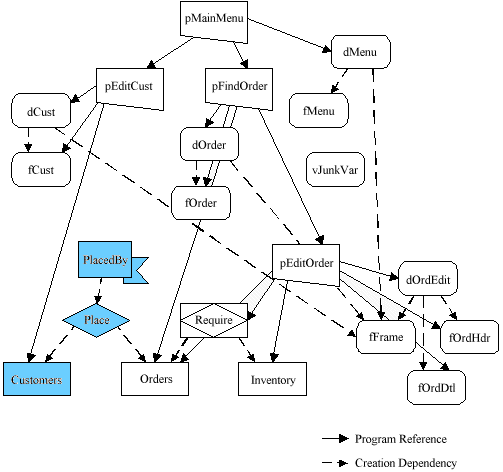
Objects Selected by “Customers +x t”

This selects only objects that use Customers by means of a creation dependency, as well as any objects that have creation dependencies on these dependent objects, and so on all the way up to the root of the tree. Program dependencies are ignored.

 Next suppose we want to list only the objects that use Customers by  means of a program dependency:

ZOMList Customers +x p

The diagram below highlights the selected objects:

Objects Selected by “Customers +x p”

This selects only objects that use Customers by means of a program dependency, as well as any objects that have program dependencies on these dependent objects, and so on all the way up to the root of the tree. Creation dependencies are ignored.

 Next suppose we want to list only the objects that use Customers by means of either creation or program dependencies and recursively search all the way back to the root:

ZOMList Customers +x pt

The diagram below highlights the selected objects:

Objects Found by “Customers +x pt”

This selects only objects that use Customers by means of any dependency, as well as any objects that have a dependency on these dependent objects, and so on all the way up to the root of the tree.

 Now suppose we want to list only the objects that use Customers by means of either creation or program dependencies and recursively search all the way back to the root, but not include the Customers object:

ZOMList Customers +x pth

The diagram below highlights the selected objects:
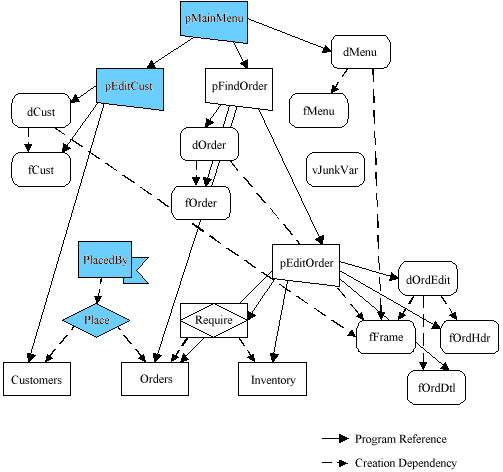
Objects Selected by “Customers +x pth”

This selects objects that only use Customers by means of any dependency, as well as any objects that have a dependency on these dependent objects, and so on all the way up to the root of the tree. However, this does not select the set of objects that were used as the starting point of the explosion. This is called a hollow explosion.

In a hollow explosion, the selected object set does not contain the original objects which fed the explosion algorithm in the first place.

Enabling ZOM

ZOM is an integrated component for object management. It is highly recommended that it remains on permanently to obtain the benefits of analyzing and manipulating objects. If you are using ZOM on the command line, you must first enable ZOM before using any of the object management services during a Zim session. This is done by invoking ZOMEnable as shown in the following example:

ZOMEnable

This procedure initializes the ZOM for the session and searches its Object Dictionary for any objects that are unknown to the ZOM. These objects are automatically “registered” in the ZOM object database. (The registration of the object is described later in this section.)

If you plan to make regular use of ZOM from the command line, it is recommended to run ZOMEnable in your startup program (ie, ZimPROF) while developing an application.

If, during a session, you want to shut down ZOM, issue the ZOMDisable command as shown in the following example:

ZOMDisable

Importing Objects

Objects are imported using the ZOMImport command. ZOMImport imports all objects described in the ASCII files produced by ZOMExport. Therefore, before you can use ZOMImport, you must first place the ZOMExport files in your database directory. Then, to invoke ZOMImport, enter

ZOMImport

You can also import Z41 files that are compatible with older versions of ZOM as shown in the following example:

ZOMImport ;f Z41

ZOMImport can also be used with the standard ZimSAVE object description files. If you want to import objects from ZimSAVE format files, enter

ZOMImport ;f DT4

Exporting Objects

Objects are exported using the ZOMExport command. The objects to export are identified using the normal object selection criteria. For example, suppose you have associated all the objects you want to export with the keyword “To_Export”. The following command exports these objects:

ZOMExport +k To_Export

ZOMExport builds a series of ASCII files containing the object descriptions. These files are placed in your database directory. By default, all files are suffixed with “.Z50” and are suitable for use with Zim version 5.0 and later.

You can also create files with suffix “Z41” which are compatible with 4.XX versions of ZOM. For example,

ZOMExport +k To_Export ;f Z41

You can also have ZOMExport build files in the standard ZimSAVE format. These files could then be imported using the standard ZimLOAD utility. (ZimSAVE creates a series of files in the database directory typically suffixed with “.DT4”.) The following exports object descriptions in ZimSAVE format:

ZOMExport +k To_Export ;f DT4

Exporting and Importing Objects with ZOM

ZOM provides two special services for exchanging objects between separate development environments. Objects are exported from one environment using ZOMExport and imported into another environment using ZOMImport. These services use a machine-independent ASCII file format to exchange objects.

Objects being exchanged retain their object key identification. The object key enables ZOMImport to compare the objects being imported with the existing objects in the target environment. ZOMImport can then perform an intelligent merge of the imported and existing objects, detecting new objects, deleted objects, and changed objects.

Note: The Export and Import wizards provide a wider range of functionality when porting applications. ZOMExport and ZOMImport are suited only for exporting object dictionary definitions, where the wizards export generated applications and framework metadata.

Keywording Objects

A keyword is a user-defined string that is associated with an object. Any number of keywords can be assigned to an object; keywords can be added and deleted at any time. You can then use the keywords to select objects to process. For more information on methods for assigning and deleting keywords, see Processing Options.

Keywords have many uses. Most often keywords are used to classify the objects in an application. For example, you can assign different keywords to identify the objects in the different subsystems of your application.

ZOMSet *Contracts* ;k Contract_System

ZOMSet *Receivables* ;k Receivable_System

You can classify your objects based on type, as shown in the example below:

ZOMSet +t Win, Form ;k UserInterface

ZOMSet +t Ent, Rel, Role ;k Database

However, keywords can also be used as a quick means of accessing a specific set of objects. For example, the following example associates the keyword “Just_ReCreated” to the objects processed by the ZOMReCreate service:

ZOMReCreate +t ent,role ;k Just_ReCreated

This gives you quick access to this set of objects for further processing,  as shown in the following example:

ZOMList +k Just_ReCreated

Keywords can be used in many other contexts; you are limited only by your imagination.

Locking Object Definitions

You can lock an object so that its definition cannot be changed by any ZOM service (until it is unlocked). When an object is locked, it cannot be erased, deleted, destroyed, recreated, moved, renamed, and so on. Locking an object is similar to write protecting the object.

You can set and reset the locked property for an object(s) using the ‘L’ property indicator and the ZOMSet service. For example, to lock all objects named Employees, enter

ZOMSet Employees ;p l

To unlock the same objects, use the negation indicator (!) as shown below:

ZOMSet Employees ;p l!

If you lock a Zim directory object, all the objects belonging to that directory are implicitly locked as well. Thus, the following example locks all objects in the Release3 directory:

ZOMSet Release3 ;p l

Unlocking a directory object implicitly unlocks all objects belonging to that directory that have not been explicitly locked individually.

Note: A ZOM lock locks the object only as far as the ZOM services are concerned. A ZOM lock does not prevent the object from being changed directly using the standard CREATE, ERASE, and RENAME commands. However, changes made in the Development Center, where ZOM is always enabled, respect any object locks.
Locks in ZOM are separate from locking enabled in multi-user applications to control concurrent access to a database.

Using ZOM – the First Time

ZOM keeps track of two types of information about objects:

  1. object attributes such as the object’s name and type
  2. object dependencies such as the fact that a program uses (i.e. refers to) other objects

Because object descriptions can be added to the object dictionary at any time, when you invoke a ZOM command, ZOM does a quick check for new objects. New objects are “registered”, meaning they are assigned a unique object key and are known to ZOM. Dependency information is updated by ZOM commands that can change dependencies (e.g. ZOMCompile and ZOMReCreate). Of course, you can still create and compile using the regular Zim commands, meaning that ZOM’s dependency information can be out-of-date. The ZOMTouch command can be used to examine objects and update the dependency information.

With that in mind, the first time you use the ZOM, you will need to make the ZOM “aware” of the objects in your application. The simplest way to do this is to “touch” all objects in your application using the ZOMTouch command.

For each object encountered, ZOMTouch records information such as the object’s name, type, and location. In addition, the object’s current state is recorded along with any dependencies between the object and other objects in the application.

If you have a large number of objects in your application, the process can take a considerable amount of time. Consider executing ZOMTouch overnight or at some other convenient time. Once ZOMTouch has finished processing, ZOM has a complete picture of the objects in your application and the interdependencies between these objects.

ZOM – ZIM Object Management

ZOM, or ZIM Object Management, provides extensive support for managing the objects that make up your applications.

ZOM is a collection of services that assist you in manipulating, analyzing, and maintaining application objects, including programs. These services also support you in managing development projects, migrating applications to new computer systems, and building custom development tools such as program generators.

ZOM services are available as a collection of command line utilities. In this section, examples of ZOM are shown at the command prompt. ZOM Services help developers manipulate and analyze application objects provide a powerful set-oriented method of investigating and managing objects and object dependencies provide a homogeneous view of objects independent of object type provide facilities to co-ordinate development projects and development teams provide high-level services for use in building custom development tools.

ZOM features the following facilities:

  • support for the creation and destruction of objects and their definitions
  • object query and analysis
  • object dependency processing
  • object import, export, comparison and conversion utilities
  • keyword indexing of objects.

ZOM also provides a solid foundation for creating custom tools to support your special development needs and to automate repetitive tasks. Code generation, version control, application deployment, application porting, and other tasks can be automated using ZOM.

Diagnosing Application Problems with ZOM

ZOM provides many services and features that have been described above for inspecting and manipulating the objects in your application to resolve problems (finding dependent, depending and unreferenced objects and objects that do not exist, for example). In addition, ZOM provides two special services to help you analyze problems in your application:

ZOMDiagnose, ZOMViewLog

The ZOMDiagnose command analyzes the objects in your entire application and their interdependencies. Any inconsistencies discovered are reported to you for further action. For example, suppose an attempt to recreate an EntitySet, Employees, has failed, leaving several relationship and role objects that depended on the EntitySet in an invalid state. ZOMDiagnose discovers these problems and reports them to you. A report is presented that itemizes the objects requiring attention. A sample of this report is shown in ZOMDiagnose.

The ZOMViewLog command enables you to browse the ZOM activity log. In the log are progress reports from the ZOM services you have executed as well as any error messages encountered. You can peruse the activity log to discover why certain operations did not succeed.

For example, to find out why the EntitySet mentioned above was not recreated after executing, enter

ZOMReCreate Employees

To inspect the activity log, enter

ZOMViewLog

The error messages in the log lead you to the problem. If many objects were processed, iterate through the objects until all are processed properly.

Note: In the case of creation failures, you can also try to create all objects that do not exist (on the assumption that the create operation failed for these objects), then look at the activity log for all these objects at once. This bulk create can be accomplished by entering
ZOMCreate +pe!

en_CAEnglish