
Object Dependencies

Zim contains a number of fixed object types. The objects in any application depend on each other in various ways. These dependencies among objects form a network of interrelationships.

An EntitySet, for example, depends on its fields. If the definition of a field changes, then the definition of the EntitySet changes. A relationship object depends on the EntitySets that it is relating. A relationship object can also use constants, variables, and form fields, and so depend on those objects as well. A program can reference any object, including other programs. These references create dependencies between the program and the objects referenced.

ZOM tracks dependencies between objects. There are two basic kinds of dependencies:

  • Creation Dependency
  • Program Call Dependency

A Creation Dependency occurs when an object references another object in its definition (i.e., when the object is created).

A Program Call Dependency occurs when a document object references another object in its program code.

The diagram below shows the objects in a hypothetical application. The lines between objects illustrate dependencies between objects. This diagram is called the object dependency tree. Program that call dependencies are shown as solid black lines, while creation dependencies are shown as dotted lines.

The sample application represented here has four program objects: pMainMenu, pEditCust, pFindOrder, and pEditOrder. pEditCust and pFindOrder are called from pMainMenu. pEditOrder is called from pFindOrder. Each of these programs uses a different display object (whose names all start with “d”). The display objects, in turn, depend on form objects (whose names all start with “f”). As well, there are three EntitySets, Customers, Orders and Inventory, and two relationships, Place and Require, the latter with fields.

If we look at the object dOrder, we can see that dOrder depends on (i.e., uses) both fOrder and fFrame (via creation references). On the other hand, dOrder is depended on (i.e., used) by the program pFindOrder (via a program reference). The object fOrder depends on no other objects, but is depended on by dOrder and pFindOrder.

Example Object Dependency Tree

ZOM enables you to query the dependencies between objects and use this information to process dependent objects. You can also use this information to detect unreferenced objects that are not dependent on any other object.

There are two ways to query object dependencies:

  1. A Dependency Explosion finds the objects that depend on (i.e., use) a given object. Dependency explosion begins with an object and works up the dependency tree finding objects that use the given object. You can limit the explosion to one level up the tree (i.e., immediate ancestors) or recursively retrieve dependent objects all the way back to the root of the tree.
  2. A Dependency Implosion finds the objects that are depended on (i.e., used) by a given object. Dependency implosion begins with an object and works down the dependency tree finding objects that are used by the given object. You can limit the explosion to one level down the tree (i.e., immediate descendants) or recursively retrieve dependent objects all the way to the leaves of the tree.

The dependency information tracked by ZOM leads to some of the most powerful uses of the ZOM services in developing, maintaining, and analyzing your applications.

Unreferenced Objects

The object dependency information can also be used to select un-referenced objects that are not used by any other object. In our example, there are three un-referenced objects: pMainMenu, PlacedBy and vJunkVar. Un-referenced objects can be selected using the “u” selection criteria, as shown in the following example:

ZOMList +p u

Objects Found by Unreferenced Criteria “+p u”

Often, objects that are not referenced are no longer in use by the application and can be destroyed. This is not always the case as shown above where the unreferenced pMainMenu, which is the root of the dependency tree, is a very significant object to this application. Another object, the role PlacedBy, could have been created in the application as a convenience to users entering ad hoc queries.

Dependency Implosion

Dependency implosion is the process of finding the objects which depended on (i.e., used) by a given object, and so on down the dependency tree. There are three different kinds of implosion: immediate, creation, and program.

As an example, to list all of objects that are used by pMainMenu, enter

ZOMList pMainMenu +i

The result is the list of objects that are used by pMainMenu directly, regardless of whether the dependency is creation or program. The diagram below highlights the selected objects:

Objects Selected by “pMainMenu +i”

This selects only objects that are used by pMainMenu explicitly by means of a creation dependency or a program dependency. The objects that use these depended on objects are ignored.

Similar to dependency explosions, you can implode by either creation dependencies (using the ‘t’ option) or program dependencies (using the ‘p’ option). Now suppose we want to list only the objects that are used by pMainMenu by means of a program dependency:

ZOMList pMainMenu +i p

The diagram below highlights the selected objects:

Objects Selected by “pMainMenu +i p”

This selects only objects that are used by pMainMenu by means of a program dependency, as well as any objects that have program dependencies on these dependent objects, and so on all the way down to the leaves of the tree. Creation dependencies are ignored.

 Next suppose we want to list only the objects that are used by pMainMenu by means of either creation or program dependencies and recursively search all the way down to the leaves of the tree:

ZOMList Customers +i pt

The diagram below highlights the selected objects:

Objects Selected by “pMainMenu +i pt”

This selects objects that are used by Customers by means of any dependency, as well as any objects that have a dependency on these dependent objects, and so on all the way down to the leaves of the tree.

To list only the objects that are used by pMainMenu by means of either creation or program dependencies and recursively search all the way forward to the leaves, but not include the pMainMenu object, enter

ZOMList pMainMenu +i pth

The diagram below highlights the selected objects:

Objects Selected by “pMainMenu +i pth”

This selects only objects that are used by pMainMenu by means of any dependency, as well as any objects that are used by these dependent objects, and so on all the way down to the leaves of the tree, but not the set of objects that were used as the starting point of the implosion. This is called a hollow implosion.

In a hollow implosion, the selected object set does not contain the original objects that fed the implosion algorithm in the first place.

Dependency Explosion

Dependency Explosion is the process of finding the objects which depend on (i.e., uses) a given object, and so on up the dependency tree. There are three different kinds of explosion: immediate, creation, and program.

As an example, let’s suppose we want list all of the objects that use Customers:

ZOMList Customers +x

The result is the set of objects which use Customers directly, regardless of whether the dependency is a creation dependency or a program dependency. The diagram below highlights the selected objects:


Objects Selected by “Customers +x”

This selects only objects that use Customers explicitly by means of a creation dependency or a program dependency. The objects that use these dependent objects are ignored.

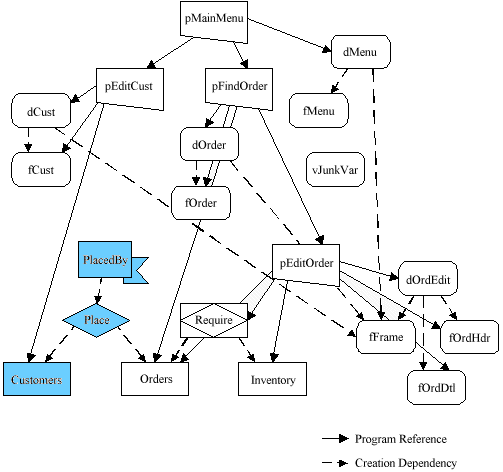
Now suppose we want to list only the objects that use Customers by means of a creation dependency:

ZOMList Customers +x t

The diagram below highlights the selected objects:
Objects Selected by “Customers +x t”

This selects only objects that use Customers by means of a creation dependency, as well as any objects that have creation dependencies on these dependent objects, and so on all the way up to the root of the tree. Program dependencies are ignored.

 Next suppose we want to list only the objects that use Customers by  means of a program dependency:

ZOMList Customers +x p

The diagram below highlights the selected objects:

Objects Selected by “Customers +x p”

This selects only objects that use Customers by means of a program dependency, as well as any objects that have program dependencies on these dependent objects, and so on all the way up to the root of the tree. Creation dependencies are ignored.

 Next suppose we want to list only the objects that use Customers by means of either creation or program dependencies and recursively search all the way back to the root:

ZOMList Customers +x pt

The diagram below highlights the selected objects:

Objects Found by “Customers +x pt”

This selects only objects that use Customers by means of any dependency, as well as any objects that have a dependency on these dependent objects, and so on all the way up to the root of the tree.

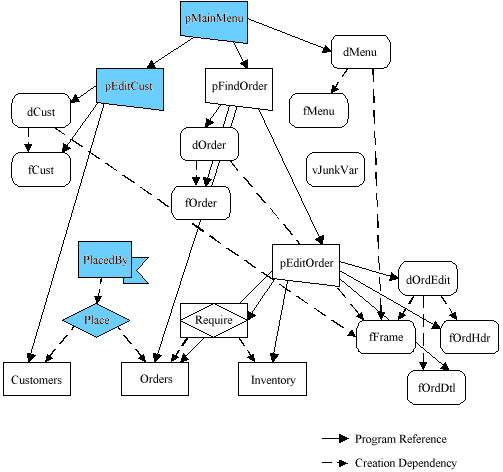
 Now suppose we want to list only the objects that use Customers by means of either creation or program dependencies and recursively search all the way back to the root, but not include the Customers object:

ZOMList Customers +x pth

The diagram below highlights the selected objects:
Objects Selected by “Customers +x pth”

This selects objects that only use Customers by means of any dependency, as well as any objects that have a dependency on these dependent objects, and so on all the way up to the root of the tree. However, this does not select the set of objects that were used as the starting point of the explosion. This is called a hollow explosion.

In a hollow explosion, the selected object set does not contain the original objects which fed the explosion algorithm in the first place.

Importing Objects

Objects are imported using the ZOMImport command. ZOMImport imports all objects described in the ASCII files produced by ZOMExport. Therefore, before you can use ZOMImport, you must first place the ZOMExport files in your database directory. Then, to invoke ZOMImport, enter

ZOMImport

You can also import Z41 files that are compatible with older versions of ZOM as shown in the following example:

ZOMImport ;f Z41

ZOMImport can also be used with the standard ZimSAVE object description files. If you want to import objects from ZimSAVE format files, enter

ZOMImport ;f DT4

Exporting Objects

Objects are exported using the ZOMExport command. The objects to export are identified using the normal object selection criteria. For example, suppose you have associated all the objects you want to export with the keyword “To_Export”. The following command exports these objects:

ZOMExport +k To_Export

ZOMExport builds a series of ASCII files containing the object descriptions. These files are placed in your database directory. By default, all files are suffixed with “.Z50” and are suitable for use with Zim version 5.0 and later.

You can also create files with suffix “Z41” which are compatible with 4.XX versions of ZOM. For example,

ZOMExport +k To_Export ;f Z41

You can also have ZOMExport build files in the standard ZimSAVE format. These files could then be imported using the standard ZimLOAD utility. (ZimSAVE creates a series of files in the database directory typically suffixed with “.DT4”.) The following exports object descriptions in ZimSAVE format:

ZOMExport +k To_Export ;f DT4

Exporting and Importing Objects with ZOM

ZOM provides two special services for exchanging objects between separate development environments. Objects are exported from one environment using ZOMExport and imported into another environment using ZOMImport. These services use a machine-independent ASCII file format to exchange objects.

Objects being exchanged retain their object key identification. The object key enables ZOMImport to compare the objects being imported with the existing objects in the target environment. ZOMImport can then perform an intelligent merge of the imported and existing objects, detecting new objects, deleted objects, and changed objects.

Note: The Export and Import wizards provide a wider range of functionality when porting applications. ZOMExport and ZOMImport are suited only for exporting object dictionary definitions, where the wizards export generated applications and framework metadata.

Registering an Object

For ZOM to know about an object, the object must first be registered. The registration process requires no effort on your part since registration is automatic and occurs when you use a ZOM service. Each ZOM service quickly searches for any unregistered objects and registers them in the knowledge base.

When an object is registered, it is assigned an object key that uniquely identifies it. The object key is used internally by ZOM to track the object during its lifetime, even if the object changes name or location. ZOM also uses the object key to track objects that are maintained at several separate development sites.

After registration, ZOM knows the object exists. However, at this point, ZOM knows very little about the object beyond its name, type, and object key. For ZOM to understand more about the object, you must “touch” the object.

Set-oriented Manipulation of Objects

The Zim object definition commands (e.g., CREATE, ERASE, RENAME) operate against a single object at a time. For example, an EntitySet is created using a CREATE command. If you needed to create all of the EntitySets, you need to issue a series of these commands.

ZOM, on the other hand, operates on sets of objects. ZOM enables you to select a set of objects from among the universe of objects in your application and apply an operation against that set of objects. For example, recreating all EntitySets is as simple as executing the command:

ZOMReCreate +t Ent

The “+t Ent” syntax is an example of the powerful selection criteria available for retrieving objects. In this case, “+t Ent” indicates that the Type of the object must be EntitySet. As you read in the following subsections, there are many other selection criteria, as well as operations for combining sets of objects in various ways.

Touching an Object

When you “touch” an object, ZOM performs an in-depth analysis of the object and records the resulting information in its knowledge base. Objects are “touched” using a special ZOM service, ZOMTouch. For example, the following command touches the Contracts object :

ZOMTouch Contracts

ZOMTouch determines the object’s current state and discovers any dependencies between the object and the other objects it references. The source of the dependency information is Zim’s standard dependency tracking database. Zim maintains dependency information for all objects and updates this information when an object is created or a program is parsed or compiled.

Once ZOMTouch has finished processing, ZOM has a complete picture of the object and any interdependencies with other objects. This in-depth information enriches ZOM’s knowledge base and is the foundation for the powerful object analysis and manipulation you can perform with other ZOM services.

As you make changes to your application objects, this information is updated automatically if you use ZOM services. As you edit the program code, the ZOM’s knowledge of dependencies between the program object (ie document) and the objects referenced in the program becomes out of date. To update the ZOM knowledge base, “tap” the changed document objects.

Note: For more information on Zim’s dependency tracking, see SET DEPENDENCY.

pt_BRPortuguese